Business Engineering Page

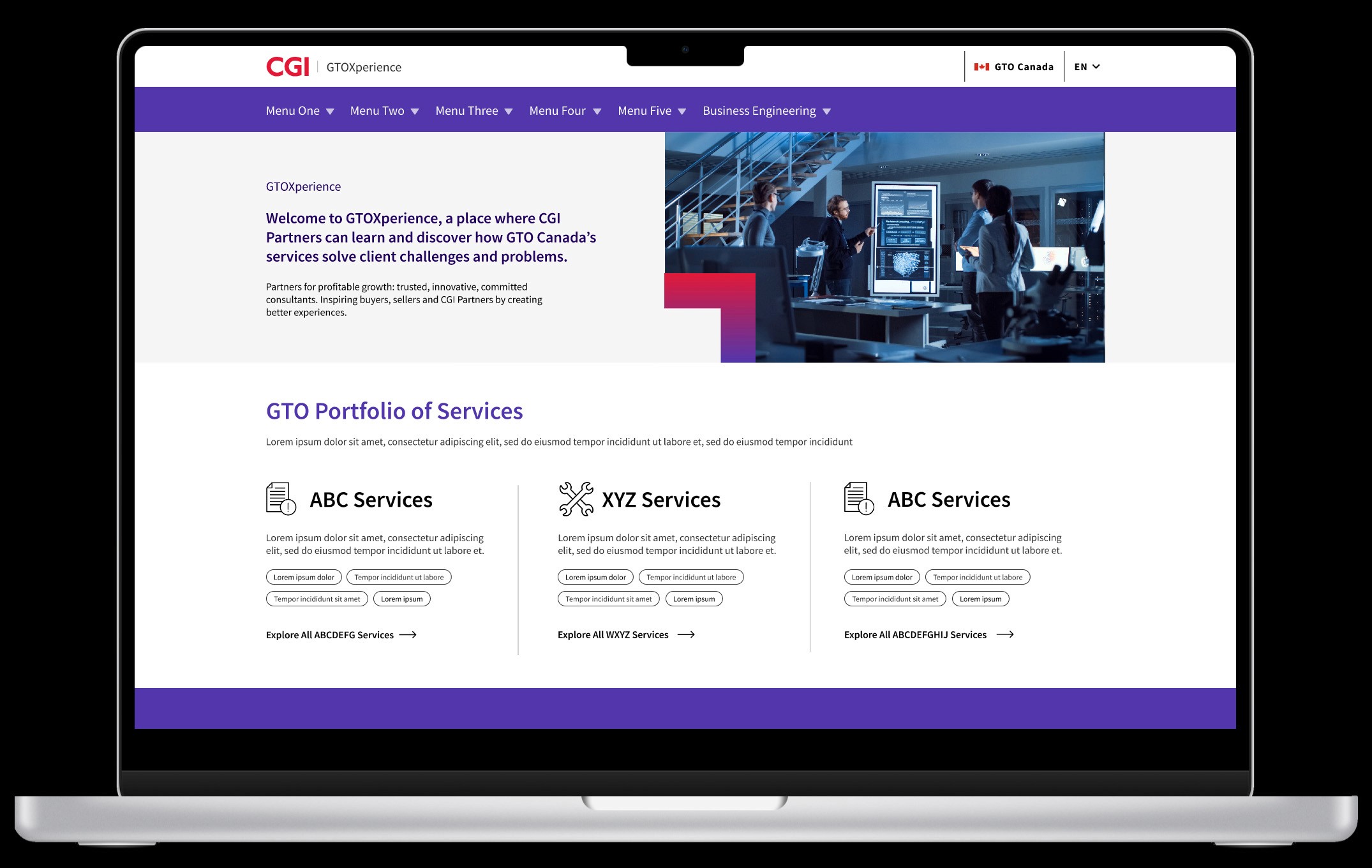
Designed a resource page on CGI's internal platform (GTOXperience) with complex interactive features that centralized BE information and streamlined collaboration.

*Due to confidentiality, all web content has been substituted with placeholders.

Company

CGI Inc.

Company

CGI Inc.

Company

CGI Inc.

Team

1 Product Owner, 1 PM, 1 Designer, 1 Developer

Team

1 Product Owner, 1 PM, 1 Designer, 1 Developer

Role

Designer

Role

Designer

Role

Designer

Timeline

6 weeks — Shipped Q3 FY2025

Timeline

6 weeks — Shipped Q3 FY2025

Timeline

6 weeks — Shipped Q3 FY2025

Skills

IA | Design Systems | Prototyping | Figma | Illustrator

Skills

IA | Design Systems | Prototyping | Figma | Illustrator

Skills

IA | Design Systems | Prototyping | Figma | Illustrator

Outcome

Launched a resource hub that streamlined BE discovery and accelerated collaboration for internal consulting teams.
Outcome

Launched a resource hub that streamlined BE discovery and accelerated collaboration for internal consulting teams.

Outcome

Launched a resource hub that streamlined BE discovery and accelerated collaboration for internal consulting teams.

(001)

— What's GTOXperience?

(001)

— What's GTOXperience?

GTOXperience is an internal platform for CGI consultants to learn about IT services offered by the Global Technology Operations (GTO) business unit and easily access sales enablement materials.

A one-stop shop for service learning and sales enablement materials.

Some numbers for context:

35+

Services Featured

200+

Documents, Materials and Tools

3,000+

Visits Per Month

(001)

— What's GTOXperience?

GTOXperience is an internal platform for CGI consultants to learn about IT services offered by the Global Technology Operations (GTO) business unit and easily access sales enablement materials.

A one-stop shop for service learning and sales enablement materials.

Some numbers for context:

35+

Services Featured

200+

Documents, Materials and Tools

3,000+

Visits Per Month

(002)

— Project Request:

(002)

— Project Request:

(002)

— Project Request:

"Right now, teams don't know how to reach us or what we actually offer. We need a central place to point people to."

Context:

The Business Engineering (BE) team approached us with a request to build a resource page that would help other internal teams understand their processes, services and how to work together.

Design goal:

Create a page that feels cohesive with the existing GTOX site while improving content discoverability.

(003)

— Information Architecture.

(003)

— Information Architecture.

(003)

— Information Architecture.

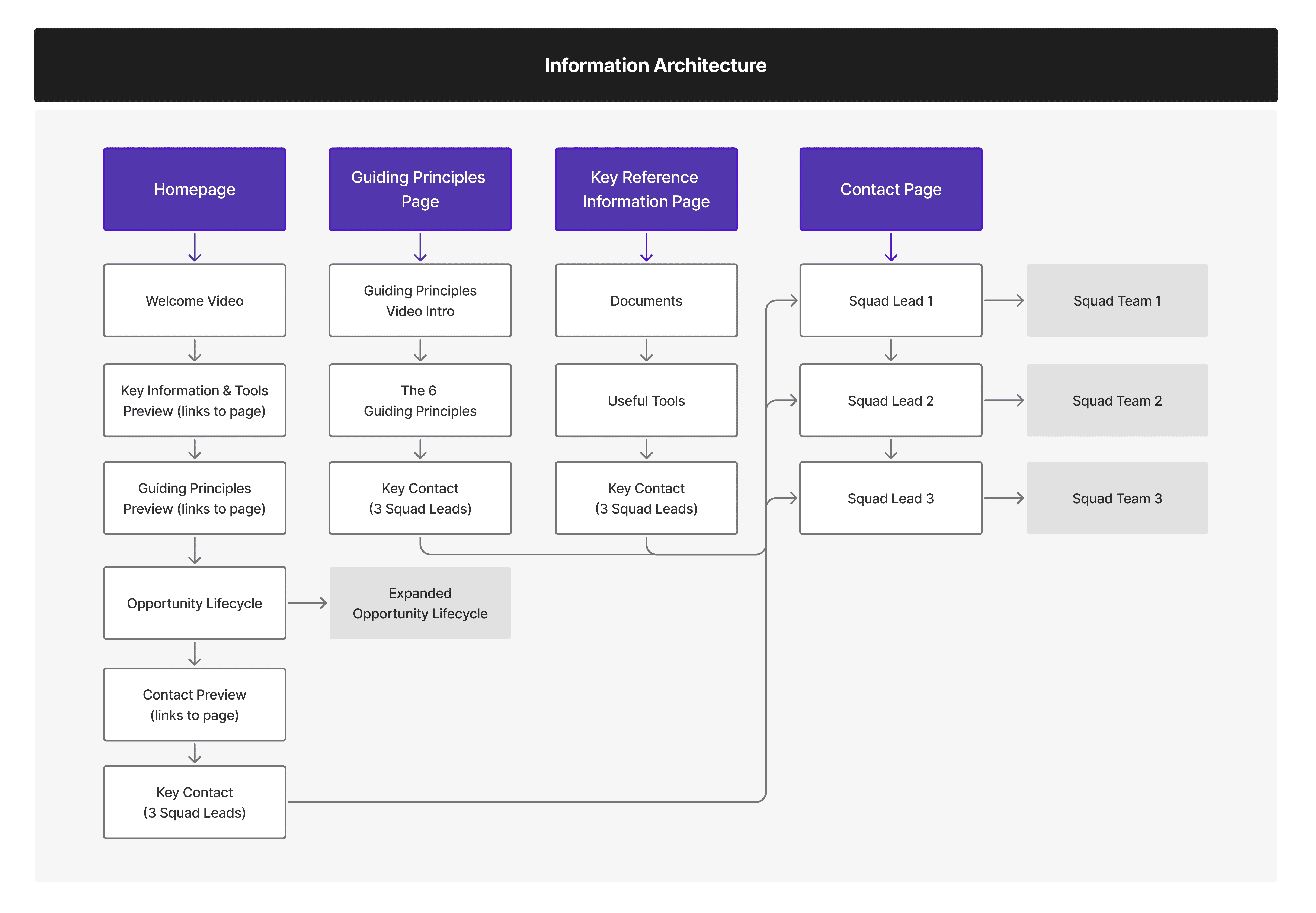
After reviewing the content received from the BE team, I organized the page into 4 main sections that prioritize what consulting teams need most when considering collaboration.
#1

Homepage

Introduces BE and their value proposition so users understand what the team does upfront.

#2

Guiding Principles

Outlines the team's approach and methodology so other teams understand how BE works.

#3

Key Reference Information

Consolidates downloadable documents and resources in one accessible place.

#4

Contact

Lists the three squad teams with their leads and members for easy outreach.
(004)

— Design Process.

(004)

— Design Process.

(004)

— Design Process.

Multi-device Design:

Using CGI design systems, I created high-fidelity wireframes for both desktop and mobile versions of the homepage and subpages based on the IA above.

Multi-device Design:

Using CGI design systems, I created high-fidelity wireframes for both desktop and mobile versions of the homepage and subpages based on the IA above.

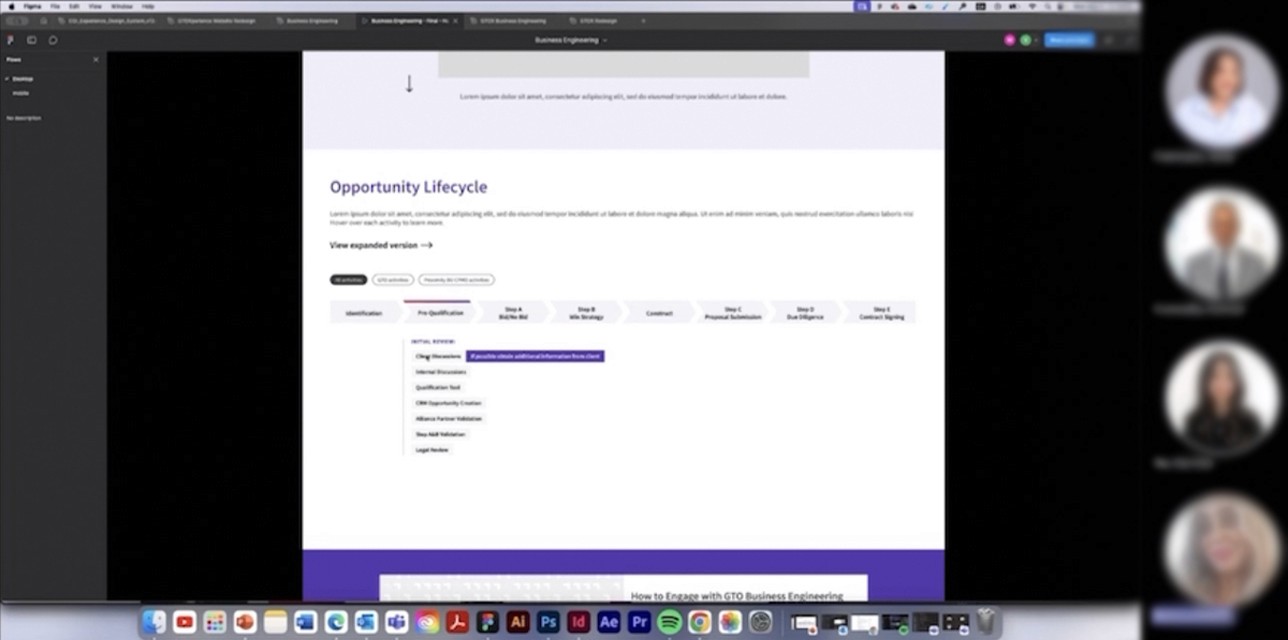
The Opportunity Lifecycle is an interactive element that maps Business Engineering's eight-step project process. This type of interactive element was unprecedented at CGI. Working from a sketch provided by the BE team, I designed an interactive element that brought their project process to life. I added filtering, hover states and expandable content to help users navigate the eight-step timeline based on their needs.

Key Feature: Opportunity Lifecycle

Key Feature: Opportunity Lifecycle

The Opportunity Lifecycle is an interactive element that maps Business Engineering's eight-step project process. This type of interactive element was unprecedented at CGI. Working from a sketch provided by the BE team, I designed an interactive element that brought their project process to life. I added filtering, hover states and expandable content to help users navigate the eight-step timeline based on their needs.

(005)

— Testing & Stakeholder Review.

(005)

— Testing & Stakeholder Review.

(005)

— Testing & Stakeholder Review.

Technical feasibility review:

Design iteration:

Before finalizing the design, we met with the developer to confirm all pages were technically feasible. After getting approval, I turned the wireframes into high-fidelity prototypes and presented them to the BE team and senior leaders through multiple review sessions for final sign-off.

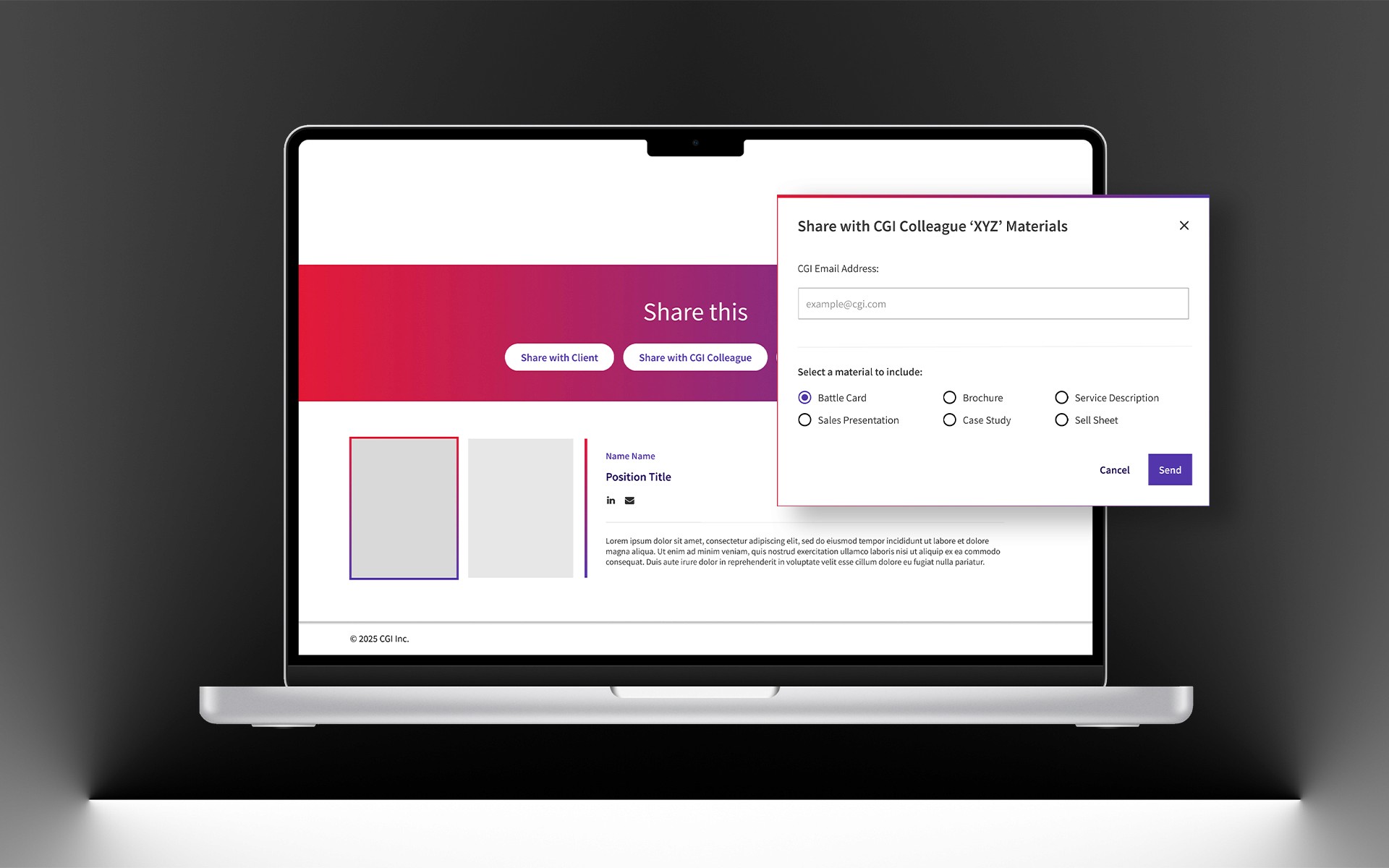
Feedback from a SVP led to 1 key addition: a popup displaying the BE team org chart for better visibility into broader team structure and reporting lines beyond the squad contacts.

Design iteration:

Technical feasibility review:

Feedback from a SVP led to 1 key addition: a popup displaying the BE team org chart for better visibility into broader team structure and reporting lines beyond the squad contacts.

Before finalizing the design, we met with the developer to confirm all pages were technically feasible. After getting approval, I turned the wireframes into high-fidelity prototypes and presented them to the BE team and senior leaders through multiple review sessions for final sign-off.

(006)

— Final Design.

(006)

— Final Design.

#1

#1

Homepage

The homepage introduces Business Engineering with preview sections that link to subpages and the Opportunity Lifecycle timeline.

My design rationale:

I set up the homepage as a starting point, showing users what's available without overwhelming them. Each preview section gives a taste of what they'll find, so they can jump straight to what matters to them.

#2

#2

[submenu]

Guiding Principles Page

This page outlines Business Engineering's six guiding principles—the core values that shape how the team approaches projects and collaboration.

My design rationale:

I used CGI's grid layout pattern with icons and descriptions for consistency with cgi.com. Each principle gets equal visual weight. The video intro at the top features an SVP explaining the principles, providing leadership context upfront.

#3

#3

[submenu]

Key Reference Information Page

This page consolidates downloadable documents and useful tools in one accessible place for easy reference.

My design rationale:

I organized resources into two sections: Key Reference Information and Useful Tools, using a card layout. Each card includes a brief description so users can quickly scan what's available and access what they need.

#4

#4

[submenu]

Contact Page

This page makes it easy to find the right person to reach out to, featuring three squad teams with their leads and members.

My design rationale:

I placed a "How to Engage with BE" document section at the top to set expectations before users connect with the team. Below, each squad lead gets a card with contact info and a "View the squad" button linking to a dedicated page showing the full team with individual profiles, contact links, and bios.

(006)

— Final Design.

#1

Homepage

The homepage introduces Business Engineering with preview sections that link to subpages and the Opportunity Lifecycle timeline.

My design rationale:

I set up the homepage as a starting point, showing users what's available without overwhelming them. Each preview section gives a taste of what they'll find, so they can jump straight to what matters to them.

#2

[submenu]

Guiding Principles Page

This page outlines Business Engineering's six guiding principles—the core values that shape how the team approaches projects and collaboration.

My design rationale:

I used CGI's grid layout pattern with icons and descriptions for consistency with cgi.com. Each principle gets equal visual weight. The video intro at the top features an SVP explaining the principles, providing leadership context upfront.

#3

[submenu]

Key Reference Information Page

This page consolidates downloadable documents and useful tools in one accessible place for easy reference.

My design rationale:

I organized resources into two sections: Key Reference Information and Useful Tools, using a card layout. Each card includes a brief description so users can quickly scan what's available and access what they need.

#4

[submenu]

Contact Page

This page makes it easy to find the right person to reach out to, featuring three squad teams with their leads and members.

My design rationale:

I placed a "How to Engage with BE" document section at the top to set expectations before users connect with the team. Below, each squad lead gets a card with contact info and a "View the squad" button linking to a dedicated page showing the full team with individual profiles, contact links, and bios.

(007)

— Outcome & Reflection.

(007)

— Outcome & Reflection.

(007)

— Outcome & Reflection.

25%

Increase in materials downloads

within 3 months after the page launched, indicating consultants were actively using the page to access resources.

What I learned:

Managing input from the BE team, developer and senior leaders meant constantly balancing what everyone needed with what was actually buildable. It taught me how to navigate competing priorities while keeping the user experience front and center.

Looking ahead:

The page is live, and I'm curious to gather feedback from the consulting teams who use it. Are they finding what they need? Is the Opportunity Lifecycle easy to navigate? Real usage data would help guide future improvements and ensure the page actually serves its purpose.
No heading elements found. Showing placeholder content.